

























How Windows handles unassociated file types across versions
By
jandeboevrie
Summary
A blog post examining how different versions of Windows handle clicking on unassociated file types (files without a default program). The author explores the UI evolution across Windows versions, showing the dialog boxes and prompts users encounter when trying to open unknown file types. The post is a casual, technical deep-dive into a niche Windows behavior.
Source
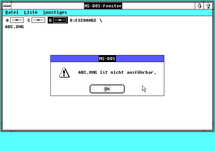 Hacker NewsHow Windows handles unassociated file types across versionsmovq.de
Key quotes
· 3 pulledLet's open the file manager and click on a file that is not a .EXE or something known to the system like .TXT. What happens?
I don't have access to each and every version of Windows under the sun, only to a few of them.
Besides, it's super hot where I live and I can't do anything meaningful anyway, so here we go.
You might also wanna read

Windows File History: A built-in version backup tool that's disabled by default
Windows includes a built-in version history feature called File History that automatically backs up previous versions of files, allowing use
 makeuseof.com·2h ago
How to Enable or Disable AI Actions in Windows 11 File Explorer Context Menu
This guide explains how to enable or disable AI-powered actions in the File Explorer right-click context menu in Windows 11. The AI Actions
 thewindowsclub.com·27d ago
The accept attribute on file inputs works differently across platforms: Windows and Android filter properly, Apple does not
The article discusses the problem with using the accept attribute on HTML file input elements. On Apple devices (macOS/iOS), the accept attr
 adamsilver.io·14d ago
Windows and Linux Sensitive Directory Paths: A Security Reference for File Inclusion Exploitation
This article provides a technical reference for exploiting file inclusion and arbitrary file download vulnerabilities. It covers file lookup
 dev.to·16d ago
Exploring union types in .NET 11 (C# 15): A developer's guide to the new feature
This article explores the introduction of union types in .NET 11 (C# 15), a long-requested feature. The author explains what union types are
 andrewlock.net·15d ago
Comparing UI Selection Components: Combobox, Multiselect, Listbox, and Dual Listbox
This article provides a comprehensive comparison of different UI selection components - combobox, multiselect, listbox, and dual listbox - e
 Smashing Magazine·4mo ago
Comments
Sign in to join the conversation.
No comments yet. Be the first.