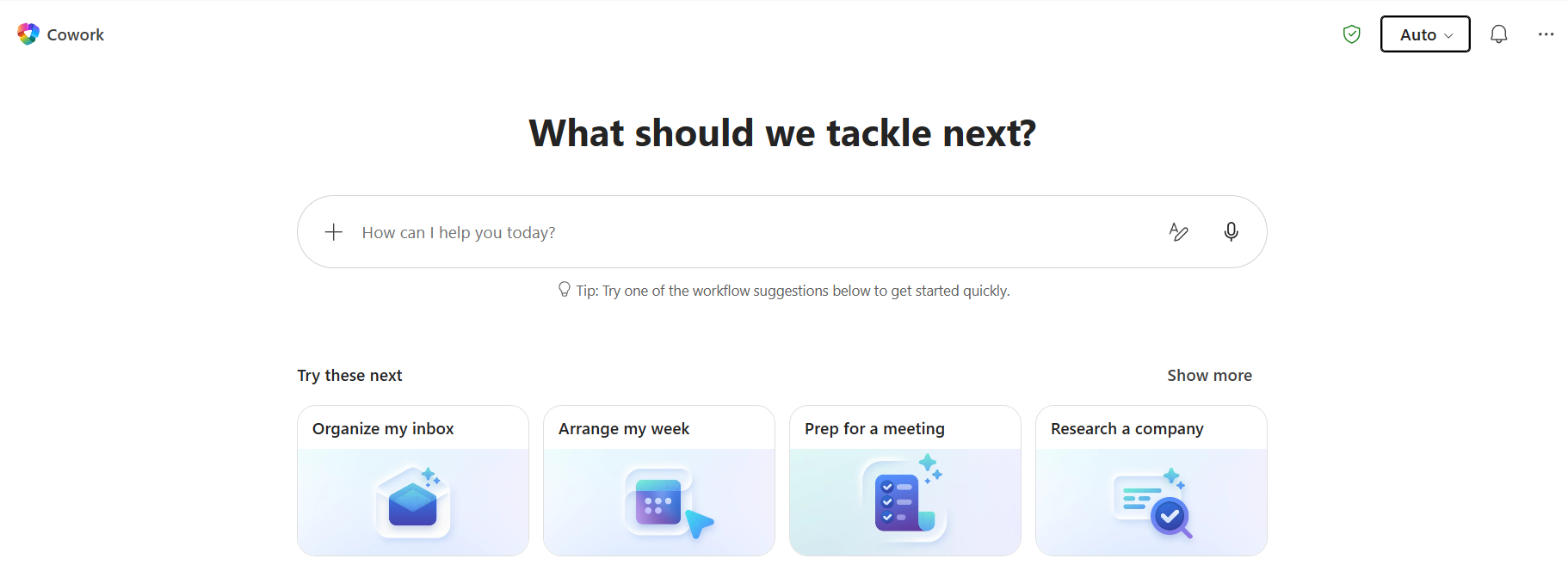
A complete record of milestones, launches, and newest innovations. Customizing Cowork just got easier Skills are custom instructions that make Cowork work the way you do, and plugins help you expand into the systems you rely on every day — and now, adding new ones is even simpler. In the Customize tab of Cowork, there are two ways to add a skill Click Create new to walk through a guided process that helps you define your skill step by step. Simply drag and drop an existing skill in (a .md, .zip, or .skill) to Upload skill Plugins work the same way: upload a package via Plugins → Upload plugin , and if you already have a Claude or Open-Plugin zip, we auto-convert it into a publishable package for you — bundled skills and MCP connectors included, no repackaging required. Make it yours — then share it And once you've built something good, you don't have to keep it to yourself. Hit Share on any skill or plugin to make it available to specific people across your org. Best of all, you stay the owner — so any edit you make flows out automatically to everyone you've shared with. Try it out today and customize Cowork to the way your work happens. Delegate complex work – Copilot Cowork is now GA Now generally available worldwide, Copilot Cowork is an agentic system that plans, executes, and delivers real work. Getting to Cowork is now simpler. The redesigned Microsoft 365 Copilot app includes a toggle that makes it easy to move between everyday chat and deeper, multi-step work — with more capabilities on the way. And once you're in Cowork, the new home page gives you a single place to manage the work already in motion. You can search and revisit past tasks, review and adjust your scheduled tasks, and personalize with skills and plugins that expand what it can do for you. Built for real work Real work doesn't happen in one app — it's a meeting in Teams, a follow-up in Outlook, a decision buried in a chat. Cowork is powered by WorkIQ, integrated with the M365 apps you already live in, and extensible to the other work systems across your org — so it maps to how work actually gets done. And because different work demands different strengths, Cowork is multi-model by design. We’re expanding our model line-up, so you always get the right capability for the task, whether that's speed, depth, or specialized reasoning. Alongside Anthropic, we're adding OpenAI GPT 5.5 Thinking (Frontier) and , coming soon, Cowork 1 — a secure, fine-tuned model post-trained specifically for Cowork tasks at substantially lower cost. In Auto mode, Cowork picks the best model for the job: Anthropic for visual work like PowerPoint and graphics, OpenAI for in-depth research with citations, and coming soon, Cowork 1 for everyday tasks. Prefer to choose yourself? Use the model picker to take the wheel. And GPT 5.5 is hosted on Azure, so your data stays within Microsoft's trusted cloud — covered by Azure's enterprise security, compliance certifications, and data-residency controls including the EU Data Boundary. Cowork also maps to the way you work by connecting to the systems you already use — and with new plugins , it can now reason and act across even more of them. Nine plugins are available now in the plugin store — Enosix, Harvey , LSEG, Miro, monday.com, Moodys, Morningstar, S&P Global Energy, and TeamsMaestro — with Databricks also available today via sideloading. Microsoft Fabric and the full Dynamics 365 portfolio — Sales, Customer Service, and ERP apps — are live as well. And eight more plugins are coming soon: Adobe, Atlassian, Box, Canva, CB Insights, Databricks (in plugin store), MoneyForward, and Templafy. Cowork doesn't just get things done — it gets things done how you like it. Skills are custom instructions that make Cowork work the way you do — and today we are making it even easier to build and refine over time as well as combining your own workflows with partner-provided or org-wide skills deployed through plugins. Imagine a tone skill that learns how you write from your last 2,000 emails, so every draft sounds like you. Or a design skill that matches your team's visual style every time. Or a business process skill that captures exactly how something gets done, start to finish — and runs it that way every time. Knowledge at work doesn't live in a handful of polished apps — it's spread across SaaS tools, internal portals, expense systems, and many other web experiences you click through every day. Now in Frontier, Cowork can use your Edge browser to get work done in those places too. With browser automation you can ask Cowork to pull an executive summary from your analyst subscription, submit an expense report by first finding the right details in your email and then submitting it, or log into your analytics dashboard and export a data table as a CSV — without leaving Cowork. One thing to keep in mind: since browser activity runs locally, your computer needs to stay on until the task is complete. Real work has a look — and Cowork now helps keep that look consistent . Presentations are now built using your company's official PowerPoint templates (GA), pulled straight from your asset library, so every deck comes out in your approved colors, fonts, logos, and layouts — no fixing slides after the fact. The same goes for images. Cowork can now create and edit visuals directly — deck graphics, document illustrations, email imagery — powered by OpenAI's ChatGPT Images 2.0 (GA). Work in confidence Enterprise-ready AI starts with keeping everything secure. And security isn't just about where your data lives — it's about the controls you already trust, extended to the actions Cowork takes. Cowork integrates with Purview controls your security and compliance teams already use today to manage Microsoft 365 Copilot. Today, Cowork is protected by sensitivity-label inheritance and display, Communication Compliance, audit logging of interactions, interaction content in Data Security Posture Management (DSPM) activity explorer, Insider Risk Management of user risk associated with Cowork interactions, as well as Data Lifecycle Management (GA 6/22) and eDiscovery. Coming soon, Cowork will have Insider Risk Management of user risk associated with Cowork interactions, as well as Data Lifecycle Management (DLM) and Data Loss Prevention (DLP) for M365 Copilot extended to Cowork. In practice, this means that Cowork prompts, responses, and generated artifacts are governed, discoverable, and retained similar to Microsoft 365 Copilot today. No new stack to learn. No separate data security posture to manage. Admins govern Cowork the same way they govern Copilot today. Get started with Copilot Cowork Copilot Cowork requires the M365 Copilot User Subscription License (USL). Users are then billed for Cowork on a usage-based basis, with charges determined by the tasks they run. For more detail on the pricing model, refer to this Microsoft Learn article . To get started with Copilot Cowork, check out the Copilot Cowork adoption site . For more information about Copilot Credits and cost management, see this Microsoft Learn article . Today we are again expanding model choice in Microsoft 365 Copilot with the addition of Anthropic's latest model—Claude Opus 4.8—now available in Copilot Cowork (Frontier). Learn more about our announcement here . Give Microsoft 365 Copilot Cowork your team's playbook. Plugins bring your organization's skills and knowledge into one workflow so Cowork can help support teams work the way they already do. Try Copilot Cowork in Frontier In plain English: a connector is the “bridge” that lets Cowork safely pull data from another platform like Dynamics 365, Fabric, and Power BI—and in some cases send updates back. A plugin packages one or more connectors and skills together to help Cowork do a specific job. If something says read & write , it means Cowork can both read data from that app and where supported and configured, help write updates back (for example, create or update a record), not just view it. * Plugins can include only skills, only connectors or a combination of the two packaged together. Custom created plugins Organizations can build custom plugins for their own needs or publish them for broader use. For example, a plugin could turn fragmented data into a single business snapshot, help new hires get up to speed by pulling the right context on day one, or connect to a pricing engine so Cowork can generate quotes on the spot. If you already use Claude Cowork plugins, you can bring them into Copilot Cowork in a few simple steps. Learn how to add , create , and manage plugins in Copilot Cowork and start building yours today. Partner plugins coming soon: * Partner integrations for LSEG (London Stock Exchange Group), Miro, monday.com, and S&P Global Energy are available in the coming weeks Whatever tools your team runs on, you’ll be able to bring them into Cowork. In the coming weeks, we're launching integrations with LSEG (London Stock Exchange Group), Miro, monday.com, and S&P Global Energy in Cowork. With additional partners including Adobe, Atlassian, Box, Enosix, Harvey.AI, Money Forward, Morningstar, and Swoop by Prezi also on the way. This is just the first wave, with more plugins to come. Native plugins & connectors We’re introducing a Fabric IQ integration, starting with Power BI, that lets you bring your Power BI data into Cowork workflows. This enables a seamless shift from spotting a trend to acting on it, across everything from pipeline health to operational KPIs. Cowork works with the Dynamics 365 plugins to connect with Sales, Customer Service, and ERP so the work that moves your business—pipeline reviews, case resolution, supplier approvals—happens alongside everything else in Cowork, with the full context of the customer and transaction right there. Here's how plugins and connectors come together in real-world scenarios The following examples are illustrative scenarios and may require configuration, custom skills, appropriate permissions, and data readiness. Capabilities may vary by c ustomer and environment. Finance contract review A finance manager asks Cowork to help review an existing customer’s contract and surface potential issue for review before countersigning, then send an email to review the results. Plugin recipe What it does Dynamics 365 ERP apps Cowork pulls AR/AP history, deferred revenue, and long term unpaid invoices and payment history from Dynamics 365 — confirming the customer's receivables are current and checking approval thresholds to surface any outliers before countersigning. Fabric IQ ….then benchmarks the terms against historical deals in Fabric IQ Core Cowork capability … so Cowork can benchmark key terms — price, payment terms, discount, tenor — against the customer's own historical deals. Custom skill: Compliance Checker A customer-built Compliance Checker skill helps validate the contract against internal policy — revenue recognition rules, approval thresholds, and required legal language — and highlights potential gaps for human sign-off. LSEG Combined Quantitative & Qualitative Diligence Cowork assembles a multi-signal view using LSEG data: Worldscope fundamentals and IBES estimates for the counterparty’s financial health, sector-level credit spread curves and live swap rates to benchmark the contract’s pricing, FX forwards for any cross-border payment terms, and a sweep of IFR and news headlines for material events – producing a market-grounded risk context to sit alongside the compliance and ERP checks. 1 S&P Global Energy Cowork then cross-references the customer contract's commodity pricing and indexation clauses against S&P Global Energy's AI Ready Data — surfacing the latest rationales, commentaries, and market analyses across crude oil, natural gas, and related commodities — to flag any terms that sit out of line with current market conditions. Out-of-the-box Cowork skills The output: a consolidated finance review report attached and sent to the right reviewers (finance, legal, and compliance leads) for approvals before countersigning. 1 Cowork does not provide financial advice or replace a financial advisor. It can help assemble market context and supporting research for a team’s review, but it should not be relied on as a complete or sole basis for financial risk assessment or decision-making. Sales: Customer commit risk An account executive asks Cowork to review deals closing this quarter and help highlight which opportunities may be at risk Plugin recipe What it does Dynamics 365 Sales Cowork pulls the open sales opportunities in the commit-stage from Dynamics 365 Sales, including estimated revenue, close date and primary contact and then... Fabric IQ ...compares each deal to historical close patterns with Fabric IQ to flag the ones that don’t follow historical norms. Core Cowork capability Then Cowork compares each live deal against those patterns — surfacing the ones that don't follow the norm. Custom skill: Risk Scoring Model Then Cowork runs everything through the customer's custom Risk Scoring skill, which applies their own internal rubric to help assign a risk tier to opportunities based on the customer ’s defined criteria . Dynamics 365 Customer Service It also checks Dynamics 365 Customer Service for account health — bringing together context from open and closed cases — since service issues are often the earliest warning signs. Out-of-the-box Cowork skills Cowork helps prepare the quarter-close review meetings for the top three opportunities, assembling draft PowerPoint decks for the team to review, and attaching them to the meeting invites. Dynamics 365 Sales After each meeting, Dynamics 365 Sales automatically attaches the Teams meeting transcript to the opportunity record — so nothing falls through the cracks. Marketing: Market Entry Strategy A marketing exec asks Cowork to help evaluate and compare three potential markets for H2. Plugin recipe What it does Dynamics 365 Sales Cowork pulls existing opportunity pipeline and customer concentration by geography from Dynamics 365 Sales to see where there's already organic pull versus where they'd be starting cold. Fabric IQ Fabric IQ models revenue scenarios for each market based on how similar expansions have played out historically, giving a realistic range. Core Cowork capability …then models revenue scenarios for each candidate market — grounding the ranges in how similar expansions have played out for this customer, not generic forecasts. Custom skill: Market Prioritization Rubric A customer can create a custom Market Prioritization Rubric skill that scores each candidate on the criteria that matter to this company so the scoring reflects their own playbook, not a generic framework Core Cowork capability From there, Cowork produces an interactive HTML dashboard with a side-by-side view of all three markets that leadership can filter and poke at before the session, and a PowerPoint deck built from the same analysis. Miro Cowork uses a Miro skill to build a visual pros/cons board — color-coded nodes laying the three markets side by side against the team's criteria and past expansion decisions, so leadership can see the trade-offs at a glance and align on a choice. monday.com A monday.com skill then spins up a planning board pre-populated with the market comparison and open decision points, so the team can work through alignment in the room instead of building the board live. Plugins are a big part of how Cowork gets more capable over time, but these are not the only enhancements coming to Cowork today. Now available on iOS and Android mobile You can now delegate tasks to Cowork wherever you are—on your commute, between meetings, or away from your desk. Start a task on your phone and pick it up later on your desktop or begin on your desktop and stay on top of it while on-the-go. Your laptop could be sitting at your desk, closed, and the task will be ready regardless. It's the same conversation, same context, always synced in the cloud and now in your pocket. Cowork is rolling out now for eligible Frontier users on mobile iOS and Android in the Microsoft 365 Copilot app. This is just the beginning. Every new plugin brings more of your organization’s skills and knowledge into Cowork, helping it work more like a capable teammate that understands how your business runs. With new mobile experiences and enterprise-grade security and governance, Cowork is ready to support work across apps, devices, and teams. Try Copilot Cowork today in the Frontier program. Today we're expanding model choice in Microsoft 365 Copilot with the addition of Anthropic's latest model—Claude Opus 4.7—now available in Copilot Cowork (Frontier). Learn more about our announcement here . Today, Copilot Cowork—designed for long-running, multi-step work in Microsoft 365—is available via the Frontier program. Join Frontier to get early access to Microsoft’s latest AI innovations. Copilot Cowork makes it easy to delegate work. Describe the outcome you want and Cowork automatically grounds the work in your emails, meetings, messages, files, and data. Powered by Work IQ, Cowork draws on signals across Outlook, Teams, Excel, and the rest of Microsoft 365 so it can act with the same understanding you bring to your job. Built for the enterprise Copilot Cowork runs with security and governance boundaries. Identity, permissions, and compliance policies apply by default, and actions and outputs are auditable. Cowork runs in a protected, sandboxed cloud environment, so tasks can keep progressing safely as you move across devices. This is what makes execution durable at enterprise scale. Working closely with Anthropic, we have integrated the technology behind Claude Cowork into Microsoft 365 Copilot. It is this multi-model advantage that makes Copilot different. Your work is not limited by one brand of models. Copilot hosts the best innovation from across the industry and chooses the right model for the job regardless of who built it. This is a pattern of work that will only become more powerful as new models and ways of working emerge. Learn more about Copilot Cowork here .


























 futurework.blog·5d ago
 Product Hunt·3mo ago
 blog.atwork.at·5d ago
 helpnetsecurity.com·1mo ago
 humzakhalid.substack.com·11d ago
Comments
Sign in to join the conversation.
No comments yet. Be the first.