
























Agents, Workers - Agents SDK v0.3.0, workers-ai-provider v3.0.0, and ai-gateway-provider v3.0.0 with AI SDK v6 support
6mo ago
Source
CloudflareAgents, Workers - Agents SDK v0.3.0, workers-ai-provider v3.0.0, and ai-gateway-provider v3.0.0 with AI SDK v6 supportcloudflare.comWe've shipped a new release for the Agents SDK v0.3.0 bringing full compatibility with AI SDK v6 and introducing the unified tool pattern, dynamic tool approval, and enhanced React hooks with improved tool handling. This release includes improved streaming and tool support, dynamic tool approval (for "human in the loop" systems), enhanced React hooks with onToolCall callback, improved error handling for streaming responses, and seamless migration from v5 patterns. This makes it ideal for building production AI chat interfaces with Cloudflare Workers AI models, agent workflows, human-in-the-loop systems, or any application requiring reliable tool execution and approval workflows. Additionally, we've updated workers-ai-provider v3.0.0 , the official provider for Cloudflare Workers AI models, and ai-gateway-provider v3.0.0 , the provider for Cloudflare AI Gateway, to be compatible with AI SDK v6. Agents SDK v0.3.0 Unified Tool Pattern AI SDK v6 introduces a unified tool pattern where all tools are defined on the server using the tool() function. This replaces the previous client-side AITool pattern. Server-Side Tool Definition import { tool } from "ai" ; import { z } from "zod" ; // Server: Define ALL tools on the server const tools = { // Server-executed tool getWeather : tool ( { description : "Get weather for a city" , inputSchema : z . object ( { city : z . string () } ) , execute : async ({ city }) => fetchWeather ( city ) } ) , // Client-executed tool (no execute = client handles via onToolCall) getLocation : tool ( { description : "Get user location from browser" , inputSchema : z . object ( {} ) // No execute function } ) , // Tool requiring approval (dynamic based on input) processPayment : tool ( { description : "Process a payment" , inputSchema : z . object ( { amount : z . number () } ) , needsApproval : async ({ amount }) => amount > 100 , execute : async ({ amount }) => charge ( amount ) } ) }; Client-Side Tool Handling // Client: Handle client-side tools via onToolCall callback import { useAgentChat } from "agents/ai-react" ; const { messages , sendMessage , addToolOutput } = useAgentChat ( { agent , onToolCall : async ({ toolCall , addToolOutput }) => { if ( toolCall . toolName === "getLocation" ) { const position = await new Promise ( ( resolve , reject ) => { navigator . geolocation . getCurrentPosition ( resolve , reject ) ; } ) ; addToolOutput ( { toolCallId : toolCall . toolCallId , output : { lat : position . coords . latitude , lng : position . coords . longitude } } ) ; } } } ) ; Key benefits of the unified tool pattern: Server-defined tools : All tools are defined in one place on the server Dynamic approval : Use needsApproval to conditionally require user confirmation Cleaner client code : Use onToolCall callback instead of managing tool configs Type safety : Full TypeScript support with proper tool typing useAgentChat(options) Creates a new chat interface with enhanced v6 capabilities. // Basic chat setup with onToolCall const { messages , sendMessage , addToolOutput } = useAgentChat ( { agent , onToolCall : async ({ toolCall , addToolOutput }) => { // Handle client-side tool execution await addToolOutput ( { toolCallId : toolCall . toolCallId , output : { result : "success" } } ) ; } } ) ; Dynamic Tool Approval Use needsApproval on server tools to conditionally require user confirmation: const paymentTool = tool ( { description : "Process a payment" , inputSchema : z . object ( { amount : z . number () , recipient : z . string () } ) , needsApproval : async ({ amount }) => amount > 1000 , execute : async ({ amount , recipient }) => { return await processPayment ( amount , recipient ) ; } } ) ; Tool Confirmation Detection The isToolUIPart and getToolName functions now check both static and dynamic tool parts: import { isToolUIPart , getToolName } from "ai" ; const pendingToolCallConfirmation = messages . some ( ( m ) => m . parts ?. some ( ( part ) => isToolUIPart ( part ) && part . state === "input-available" , ) , ) ; // Handle tool confirmation if ( pendingToolCallConfirmation ) { await addToolOutput ( { toolCallId : part . toolCallId , output : "User approved the action" } ) ; } If you need the v5 behavior (static-only checks), use the new functions: import { isStaticToolUIPart , getStaticToolName } from "ai" ; convertToModelMessages() is now async The convertToModelMessages() function is now asynchronous. Update all calls to await the result: import { convertToModelMessages } from "ai" ; const result = streamText ( { messages : await convertToModelMessages ( this . messages ) , model : openai ( "gpt-4o" ) } ) ; ModelMessage type The CoreMessage type has been removed. Use ModelMessage instead: import { convertToModelMessages , type ModelMessage } from "ai" ; const modelMessages : ModelMessage [] = await convertToModelMessages ( messages ) ; generateObject mode option removed The mode option for generateObject has been removed: // Before (v5) const result = await generateObject ( { mode : "json" , model , schema , prompt } ) ; // After (v6) const result = await generateObject ( { model , schema , prompt } ) ; Structured Output with generateText While generateObject and streamObject are still functional, the recommended approach is to use generateText / streamText with the Output.object() helper: import { generateText , Output , stepCountIs } from "ai" ; const { output } = await generateText ( { model : openai ( "gpt-4" ) , output : Output . object ( { schema : z . object ( { name : z . string () } ) } ) , stopWhen : stepCountIs ( 2 ) , prompt : "Generate a name" } ) ; Note : When using structured output with generateText , you must configure multiple steps with stopWhen because generating the structured output is itself a step. workers-ai-provider v3.0.0 Seamless integration with Cloudflare Workers AI models through the updated workers-ai-provider v3.0.0 with AI SDK v6 support. Model Setup with Workers AI Use Cloudflare Workers AI models directly in your agent workflows: import { createWorkersAI } from "workers-ai-provider" ; import { useAgentChat } from "agents/ai-react" ; // Create Workers AI model (v3.0.0 - enhanced v6 internals) const model = createWorkersAI ( { binding : env . AI , } )( "@cf/meta/llama-3.2-3b-instruct" ) ; Enhanced File and Image Support Workers AI models now support v6 file handling with automatic conversion: // Send images and files to Workers AI models sendMessage ( { role : "user" , parts : [ { type : "text" , text : "Analyze this image:" }, { type : "file" , data : imageBuffer , mediaType : "image/jpeg" , }, ] , } ) ; // Workers AI provider automatically converts to proper format Streaming with Workers AI Enhanced streaming support with automatic warning detection: // Streaming with Workers AI models const result = await streamText ( { model : createWorkersAI ( { binding : env . AI } )( "@cf/meta/llama-3.2-3b-instruct" ) , messages : await convertToModelMessages ( messages ) , onChunk : ( chunk ) => { // Enhanced streaming with warning handling console . log ( chunk ) ; }, } ) ; ai-gateway-provider v3.0.0 The ai-gateway-provider v3.0.0 now supports AI SDK v6, enabling you to use Cloudflare AI Gateway with multiple AI providers including Anthropic, Azure, AWS Bedrock, Google Vertex, and Perplexity. AI Gateway Setup Use Cloudflare AI Gateway to add analytics, caching, and rate limiting to your AI applications: import { createAIGateway } from "ai-gateway-provider" ; // Create AI Gateway provider (v3.0.0 - enhanced v6 internals) const model = createAIGateway ( { gatewayUrl : " , headers : { "Authorization" : `Bearer ${ env . AI_GATEWAY_TOKEN } ` } } )( { provider : "openai" , model : "gpt-4o" } ) ; Migration from v5 Deprecated APIs The following APIs are deprecated in favor of the unified tool pattern: Deprecated Replacement AITool type Use AI SDK's tool() function on server extractClientToolSchemas() Define tools on server, no client schemas needed createToolsFromClientSchemas() Define tools on server with tool() toolsRequiringConfirmation option Use needsApproval on server tools experimental_automaticToolResolution Use onToolCall callback tools option in useAgentChat Use onToolCall for client-side execution addToolResult() Use addToolOutput() Breaking Changes Summary Unified Tool Pattern : All tools must be defined on the server using tool() convertToModelMessages() is async : Add await to all calls CoreMessage removed : Use ModelMessage instead generateObject mode removed : Remove mode option isToolUIPart behavior changed : Now checks both static and dynamic tool parts Installation Update your dependencies to use the latest versions: npm install agents@^0.3.0 workers-ai-provider@^3.0.0 ai-gateway-provider@^3.0.0 ai@^6.0.0 @ai-sdk/react@^3.0.0 @ai-sdk/openai@^3.0.0 Resources Migration Guide - Comprehensive migration documentation from v5 to v6 AI SDK v6 Documentation - Official AI SDK migration guide AI SDK v6 Announcement - Learn about new features in v6 AI SDK Documentation - Complete AI SDK reference GitHub Issues - Report bugs or request features Feedback Welcome We'd love your feedback! We're particularly interested in feedback on: Migration experience - How smooth was the upgrade from v5 to v6? Unified tool pattern - How does the new server-defined tool pattern work for you? Dynamic tool approval - Does the needsApproval feature meet your needs? AI Gateway integration - How well does the new provider work with your setup?
You might also wanna read


Agents SDK — TypeScript
github.com·11mo ago
AgentState v1.0.0: Cloud-Native State Management Platform for AI Agents
AgentState v1.0.0 is a cloud-native state management system designed specifically for AI agents, providing durable state persistence with fe
 github.com·10mo ago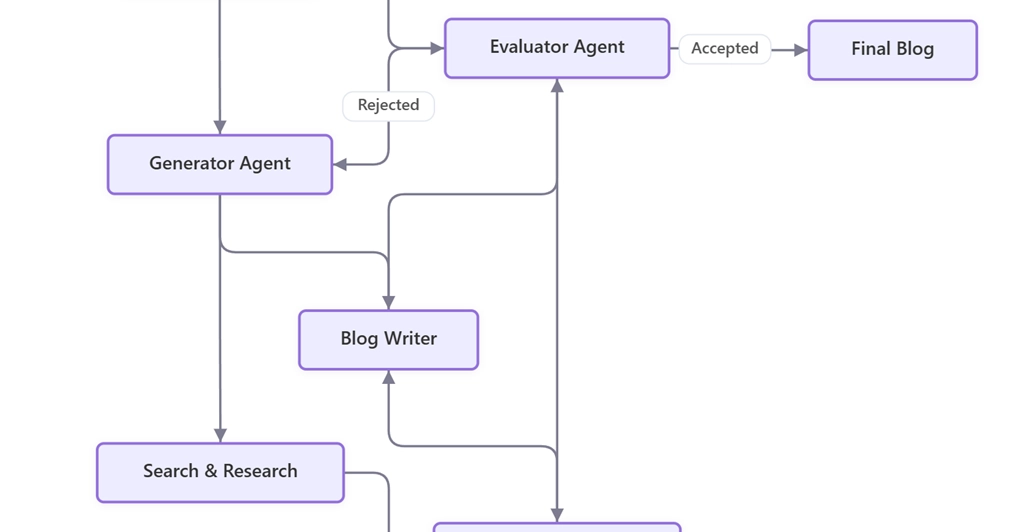
AWS Builder Center: Implementing an Agentic Planner-Generator-Evaluator Pattern with Memory Using LangGraph
This article, published at AWS Builder Center, describes an advanced implementation of an Agentic Planner-Generator-Evaluator pattern using
 dev.to·20d ago
New Alibaba AI framework skips loading every tool, cutting agent token use 99%
VentureBeat·2d ago

How to Integrate Existing AI Agents into Microsoft Teams Using TypeScript SDK
This article provides a technical guide for developers on how to integrate existing AI agents or bots into Microsoft Teams without rewriting
 microsoft.github.io·2mo ago
Deep Agents v0.6 Release: Code Interpreter, Harness Profiles, and Streaming Improvements
Deep Agents v0.6 introduces performance improvements across multiple layers, featuring a lightweight code interpreter for agent tool composi
 langchain.com·11d ago
Comments
Sign in to join the conversation.
No comments yet. Be the first.