
























Installing Linters Atom
A walkthrough for setting up and configuring linter plugins in the Atom text editor — covering both the Preferences UI and the APM command-line tool for package installation.
Read the full articleYou might also wanna read

GitHub - lumirlumir/npm-eslint-markdown: Lint your Markdown with ESLint. Additional rules for use with `@eslint/markdown`.🛠️
Lint your Markdown with ESLint. Additional rules for use with `@eslint/markdown`.🛠️ - lumirlumir/npm-eslint-markdown
 github.com·1mo ago
Bun v0.5.8
Introducing `expect()` snapshots in `bun test`, preloading modules using `bun --preload`, basic glob star support in bun install, improvemen
Atomic Editor — demo
CodeMirror 6 markdown editor with Obsidian-style inline live preview. Live demo.

Context Management Strategies for VS Code with LLM Plugins: A Complete Guide to Building Your Own AI-Powered IDE
> **Cross-posted.** This article's canonical home is [Iceberg Lakehouse]( ...

Yarn 2 plugins - an introduction
We start off with setting up an environment to build the plugin. Let’s begin with creating a new project that will be managed with Yarn 2
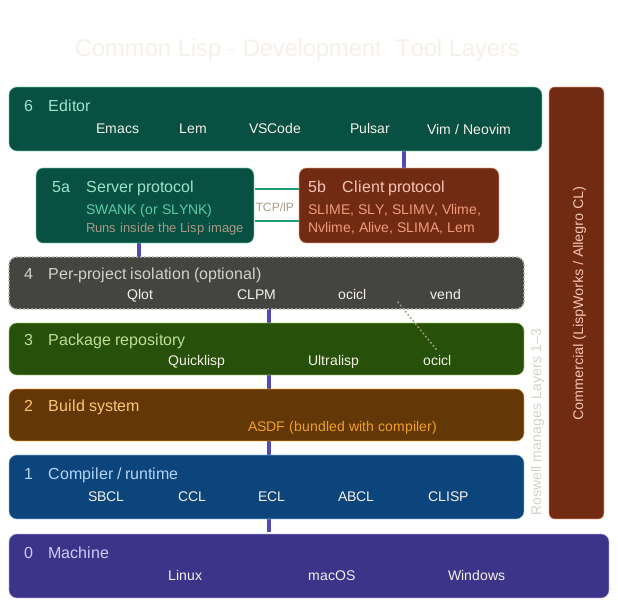
Understanding Common Lisp Development Environments: A Beginner's Guide to Tooling Layers
A beginner's exploration of the many layers of Common Lisp development environments.
 creativetension.co·3mo ago
Comments
Sign in to join the conversation.
No comments yet. Be the first.