





















Nogic: Visual Studio Code Extension for Interactive Codebase Visualization
By
davelradindra

A bagel you'd recommend to a friend without hedging.
Summary
Nogic is a Visual Studio Code extension that transforms codebases into interactive visual maps. The tool scans local codebases to create diagrams of project structure, with all processing happening locally on the user's machine for privacy. It supports multiple programming languages and collects only anonymous usage metrics for improvement purposes.
Key quotes
· 4 pulledTurn your codebase into an interactive map.
Your code stays on your machine. All parsing, indexing, and visualization happens 100% locally within VS Code.
We collect anonymous usage metrics (e.g., feature usage, performance) to improve the extension.
Right-click files or folders in the Explorer and select Add to Nogic Board
You might also wanna read


Ghost Note: VS Code Extension for Private Code Documentation Without Source Modification
Ghost Note is a VS Code extension that allows developers to attach private notes, images, videos, and tags directly to code symbols without
 Product Hunt·8mo ago
Gitlantis: Visualize Your Codebase as an Immersive 3D Ocean for Creative Project Exploration
Gitlantis is a tool that transforms codebase exploration by visualizing project files as an immersive 3D ocean world where users can navigat
Product Hunt·11mo ago
Naiad Lens: IDE Plugin for Visualizing Code Flow
Naiad Lens is an IDE plugin that auto-draws interactive architecture, sequence, and file-level diagrams, allowing users to click on any node
Product Hunt·10mo ago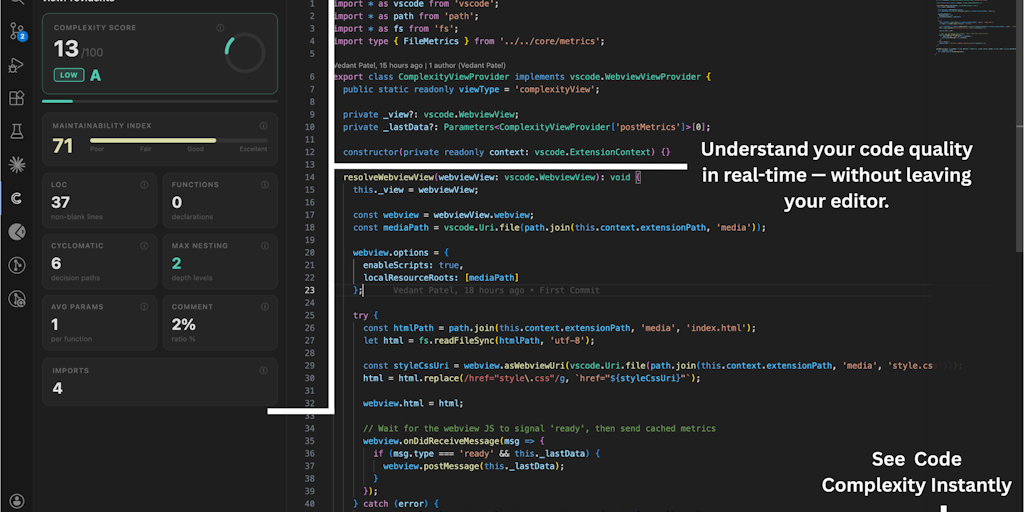
Complexity Indicator: VS Code Extension for Real-Time Code Complexity Analysis
Complexity Indicator is a VS Code extension that helps developers analyze and visualize code complexity in real time, providing actionable i
Product Hunt·1mo ago